Showing posts with label Tech News. Show all posts

Monday, August 26, 2019

BSNL 96 रुपये में हर दिन दे रही है 10 जीबी 4जी डेटाः रिपोर्ट

दोनों BSNL Prepaid Plan में यूज़र्स को हर दिन इस्तेमाल करने के लिए 10 जीबी डेटा मिलेगा। प्लान 96 रुपये और 236 रुपये के हैं।


ख़ास बातें

BSNL ने 96 रुपये और 236 रुपये के प्रीपेड प्लान पेश किए हैं

BSNL STV 96 प्रीपेड प्लान में कुल 280 जीबी डेटा मिलेगा

BSNL STV 236 प्रीपेड प्लान में 840 जीबी डेटा

खबर है कि BSNL ने दो नए प्रीपेड प्लान मार्केट में लॉन्च किए हैं। इन प्लान में यूज़र्स को हर दिन इस्तेमाल के लिए 10 जीबी 4जी डेटा मिलेगा। नए प्रीपेड प्लान 96 रुपये और 236 रुपये के हैं। इनकी वैधता क्रमशः 28 दिनों और 84 दिनों की है। बीएसएनएल ने अपने इन दोनों प्लान को उन मार्केट में  पेश किया है जहां कंपनी की 4जी सेवाएं उपलब्ध हैं। बीएसएनएल ने इन नए प्लान को और ग्राहकों को लुभाने के लिए पेश किया है। बीएसएनएल ने हाल ही में अपने 1,098 रुपये वाले प्रीपेड प्लान की वैधता 75 दिन कर दी थी।

दोनों BSNL Prepaid Plan में यूज़र्स को हर दिन इस्तेमाल करने के लिए 10 जीबी डेटा मिलेगा। प्लान 96 रुपये और 236 रुपये के हैं। 96 रुपये वाले बीएसएनएल प्रीपेड प्लान की वैधता 28 दिनों की है। वहीं 235 रुपये वाले प्लान की वैधता 84 दिनों की है। देखा जाए तो BSNL STV 96 प्रीपेड प्लान में कुल 280 जीबी डेटा मिलेगा और BSNL STV 236 प्रीपेड प्लान में 840 जीबी डेटा टेलीकॉम टॉक की रिपोर्ट के मुताबिक, बीएसएनएल ने अपने इन प्रीपेड प्लान को उन मार्केट में उपलब्ध कराया है जहां कंपनी की 4जी सेवाएं उपलब्ध हैं। बीएसएनएल ने महाराष्ट्र के चुनिंदा इलाकों में एक्टिव 4जी नेटवर्क होने की जानकारी दी है।

इन दोनों प्रीपेड प्लान के साथ कोई कॉलिंग सुविधा नहीं मिलती। रिपोर्ट में बताया गया है कि नए स्पेशल टैरिफ वाउचर सीमित समय के लिए उपलब्ध कराए गए हैं। कंपनी की वेबसाइट पर हमें ये डेटा प्लान नहीं मिले।

जैसा कि हमने आपको पहले बताया, भारत संचार निगम लिमिटेड (BSNL) ने चुनिंदा सर्कल में 1,098 रुपये के प्रीपेड रीचार्ज पैक में बदलाव किया है। टेलीकॉम कंपनी ने अपने इस प्लान की वैधता 75 दिन कर दी है। पहले इस प्लान की वैधता 84 दिनों की थी। इस प्लान में यूज़र्स 75 दिनों तक 375 जीबी डेटा इस्तेमाल कर पाएं|

Friday, August 23, 2019

Jio Effect: Airtel May Offer Free Android STB, HD LED TV with Broadband, DTH Plans

Airtel is reportedly gearing up for war against Reliance Jio yet again, this time in the broadband and DTH space. According to reports, Bharti Airtel is presently testing an integrated billing plan which includes a bundled offering of postpaid mobile subscription, home broadband and DTH, with the present testing phase being carried out in Andhra Pradesh, Madhya Pradesh and Chandigarh. The reports further state that Airtel may offer users a free Android-based smart set top box, along with even an HD LED TV for subscribers of its premium plans.


Such plans, along with the integrated billing setup, will reportedly be marketed and made live across India from as soon as September 2019, which is also when Reliance Jio's all-encompassing JioFiber plans go live across India. Airtel's move is being seen as a direct reply to Jio, which is offering a similar setup of free smart set top box along with bundled plans for mobile, television and home broadband. The end-objective for each of these operators is to have each user generate higher revenue, while ensuring that they invest into an ecosystem so as to not consider a rival's services in haste.

Airtel's smart set top box, on this note, is expected to offer OTT streaming services and interactive content such as music and gaming, alongside the standard array of HD television channels. With this, Airtel will hope to retain its customer base in the home broadband and DTH space, where it is yet again looking at a price invasion from Jio. Ever since the advent of Reliance Jio, Bharti Airtel has lost its number one position in the Indian telecom market to now rank third among the top three operators. It remains to be seen how and when are these plans introduced, and what effect do they have on users.

Saturday, March 2, 2019

Face it, product launches and events are now only “leak confirmations” and price announcements

At least half a dozen of my friends and colleagues are at the Mobile World Congress at Barcelona. And every single one of them knew almost exactly what they were going to be seeing at what stall even before they had made their way to the Spanish city. Nokia would be updating some of its range and focusing on its five camera phone, Huawei would show a folding phone, Samsung would show the S10 and a folding phone… and these were not known just by name, but in enough detail – in most cases, my friends knew what the device would look like and what its specifications would be. “I don’t even know why I am going,” one of them muttered. “Everything is pretty much known to everyone everywhere.


And this is not an aberration. Xiaomi is set to launch the Redmi Note 7 in a couple of days, and barring the price and perhaps the odd minor detail, just about everything about the phone is very well known. The source is not even a leak – the company itself has released a video featuring its brand ambassador with the device.
Welcome to the era where tech events and launches have become “leak confirmations” and “price announcements”.
Some will rightly point out that leaks have always been a part of tech life. True enough, but in the past, or at least until about 2016, there was an element of investigation involved in them. Tech writers and bloggers would haunt company cafes and outlets, trying to get a whiff of what was happening. Conclusions would be drawn based on something as vague as a screen protector or a bumper case – “if the bumper is this big, the chances are that the phone itself cannot be too large,” and so on. And well, in the rare case where someone actually managed to get a pre-launch device that had not be officially handed out, all kinds of hell would break loose from the company’s side (remember Apple and the iPhone 4?).
Yes, there would be the odd case of a company giving people a glimpse of a future product just to take the sting out of a rival product’s launch – we do remember IBM suddenly giving out extra details about the forthcoming edition of Lotus Notes (remember them?) just prior to the launch of a new edition of MS Office. But these were not too common. For the most part, companies liked to keep their product cards close to their chests – for the very simple reason that giving out too much information would also give the competition an idea of what you yourself were doing. Companies like Apple were known to be almost paranoid when it came to protecting information about their products – and publications that got products through “unofficial” sources before launch often ran the risk of being blacklisted.
All that however seemed to change a few years ago.
Perhaps it was because of the arrival of a number of new brands. Perhaps it was because of what some of my colleagues claim is a “leak culture” that is popular in the Chinese market and this period also saw the rise of Chinese brands like Xiaomi, OnePlus and Huawei. Whatever it was, suddenly leaks became almost part of company policy. Instead of having to secretly meet company executives to be given hidden glimpses of a forthcoming product, suddenly we were being called to the main office and being told to experience the product “off the record.” Today, things have reached such a pass that many companies send out official emails with “leaks” and even propose headings for articles and tweets about them. The leak of a product no longer provokes outrage but is now met with a shrug of the shoulders because hey, it is a fair chance that someone from the company already knew about it. Even the mighty Cupertino bastion seems to have fallen with people having known about the new iPhones and iPads weeks and months before their official launch and unveiling.
All of which is great news for consumers and companies both at some level. For consumers, well, they get access to product information well before a formal launch, and a lot of it is credible. For companies, the level of publicity and curiosity around a product or service always results in more publicity. And of course, the institutionalization of leaks means that there are more stories for bloggers and writers and for the comms teams of different brands – even embargo letters have got complex, with different dates being given for revelations about packaging, cameras, design, price and so on and so forth.
All of this has, however, pretty much destroyed the level of curiosity around product launches and tech events. Indeed, these events now largely exist to “gather a crowd” (them Gladiator “are you not entertained?” feels) and to confirm what leaks have so often already revealed. The only news at these events ever so often is the price and availability of the device (and even those are sometimes leaked out). I have lost count of the number of media persons who have attended events with their reports already written out, and an empty space left for the price.
Is this good or bad? I do not know. But yes, the temptation to attend events – unless one wants to meet someone or pick up a goodie bag – is diminishing by the day. There is very little excitement and even lesser curiosity. Because everything is pretty much out of the bag. I cannot remember the last tech event I attended without having a very good idea both what was being launched, almost all its features and sometimes, even its price.
Launches with surprises? One more thing? Folks, those went out with Steve.

YouTube Uploader – Let Others Upload Videos to your YouTube Channel

It is easy to upload videos to your own YouTube channel but there’s one limitation. Only the owner of the channel can upload videos to their YouTube account and they cannot delegate the task to someone else in the team.

Google Drive has the concept of shared folders. A folder can have multiple collaborators and anyone can upload files to that folder. Wouldn’t it be useful if such a feature were available for YouTube channels as well? You maintain a single YouTube account and multiple people can upload videos to your common account without the owner having their the Google account credentials with anyone.

YouTube Video Uploader for Collaboration

Introducing YouTube Uploader, a simple file upload form that lets anyone upload videos to your YouTube channel from their desktop or mobile phone. The uploader doesn’t even need a Google account and they’ll still be able to upload video files of any size to your YouTube channel.
Before we get into the implementation details, open this live demo page and upload a video file. Once the file is uploaded, YouTube will take a minute or two to process the video and it will go live immediately on the YouTube channel.

Make your Own YouTube Uploader

If you have a collaborative YouTube channel with multiple contributors, you may consider setting up your own private YouTube Uploader form and any of the contributors will be able to upload their work on your channel directly via the form.
Here’s how you can build a YouTube uploader in 3 easy steps.
  1. Click here to make a copy of the YouTube uploader script in your Google Drive. It is recommended that you create a new Google account to test the YouTube uploader before using it with your main account.
  2. Enable the YouTube API for your Google project. Go to Resources > Cloud Platform Project, click the project name and enable the YouTube Data API from the API library. Watch the video guide for details.
  3. While inside the script editor, go to Publish > Deploy as Web App and click Update.
  4. You’ll be presented with an authorization screen as the script needs permission to upload videos on your behalf and also send email notifications when a new video is uploaded. Click Allow.
That’s it. You’ll be presented with a unique URL that you can share with your team members.
The user is presented with a simple web form where they can fill in the video title, description, the video category, and the privacy mode (should the video be private,  public or unlisted). All they have to do is select a file and click “Upload” to send the video to your YouTube channel directly.

Important Points to Know:

  • When deploying the web app,  choose “Me” under the “Execute the App as” section and “Anyone, even anonymous” under the “Who has access to the app” section.
  • If you would like to disable the uploader, go to Resources > Deploy as web app and choose “Disable web app.”
  • The uploader is written in JavaScript (ES6) and compiled to Google Apps Script with Babel, Clasp and the Apps Script starter kit.
  • Keep the YouTube Uploader URL secret and only share with people you know.
  • This program comes as it is with no warranty. It may not be used for commercial applications.

How To Find Email Address of Any Domain With Email Hunter in 1 Minute

Have you ever found yourself in a situation of trying to find the email address associated with any domain
How painful is it to find the owner email address of a domain name?
I usually do a lot of outreach and the primary factor is to find the email address of a website owner.
You can always use who.is to find the domain owner email address, but that’s not the email address that will get work done.
Update: I have found another similar tool and is mentioned at the end of the article.
In today’s date, most of the websites & blogs have domain specific email address, and these emails are more authentic than the generic @gmail.com, @outlook.com email addresses.
The tool that is mentioned below, let you find the domain specific email address associated with any domain name. In short, it checks if there is any @domain.com email address associated with the domain you are searching for. Email Hunter comes out as an amazing go-to tool for digital marketers & for outreach.

What is Email Hunter & how it works?

Hunter.co is an online tool & also offers a Chrome extension to find the email address associated with a domain name. You can use their website or install the chrome addon to start using this tool.


Here is a screenshot of the Hunter chrome extension in action:

You can further click on sources to see the origin of the email. This is useful to check the credibility of the information, as sometimes it can give bogus or non-existent email address.

You can see from the above screenshot, how Email Hunter have picked the email address from various sources. As an end user, I find this service to be of great use, as at times its pain to find the email address of a blog or a website.

Bulk email search:

You can also do a bulk search using their web app. Just upload the list of domain names in a .csv file, or type it on their bulk search page, it will show you all the known email addresses associated wth these domains. You can also export the result for further use.
Hunter also offers API, which is useful for developers who want to build something at the top of this idea. I believe anyone working on a project such as blogger outreach will love to have this feature. 
Outreach:
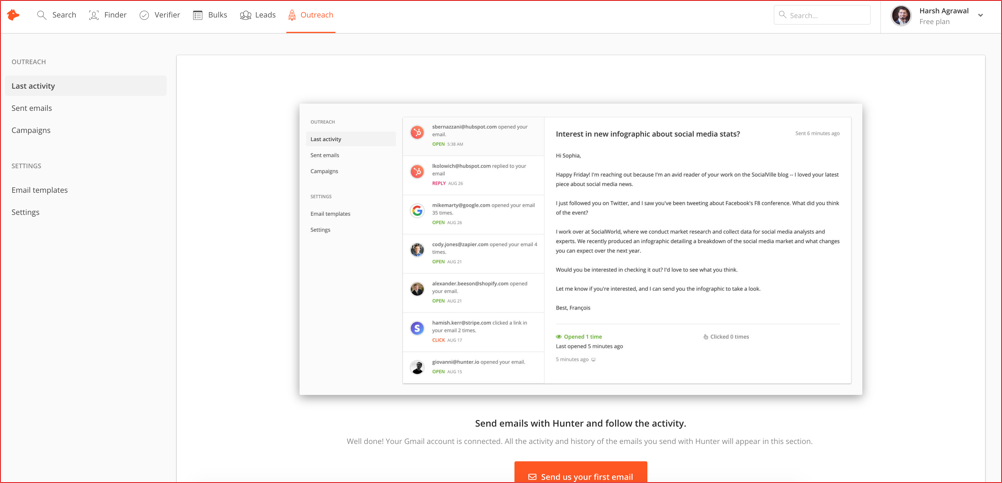
Hunter has also added outreach feature which works with your Gmail account. You can create a template to quickly send emails.

There is also in-built tracker and lead management in-built. The email tracker is also available as a stand-alone chrome extension and can be downloaded from here.
Hunter offers a free account which let you check 50 queries for a free every month. Here is the pricing structure of hunter.io:


Depending upon your need, you can pick the right package.

Any mail finder:

This is another tool that you can use along with hunter to find email addresses of an organization. Especially if you are in shoe-string budget, you can combine both (Hunter and Any mail finder) to get up to 200 free checks every month.

This one also lets you verify emails by uploading a .CSV file or you can use the API.
However, when I tested this one, I found many bogus emails for my domains. If you are looking to buy either of it, I would recommend start with Hunter and try the free version of Anymail finder.

Thursday, September 6, 2018

Get Free NetFlix & Amazon Prime Subscriptions on AirTel & VodaFone Plans

The Netflix and Amazon Prime becomes one of the most popular things among youngster. The web series and movies on NetFlix as well as Amazon Prime are quite interesting. But the subscription price is quite bit higher. Especially, the Netflix monthly subscription for a basic plan is Rs 500 and annual is Rs 6000. Most of the people don’t think worthy to invest in such things. So, that is why we are giving you offers on such things.
Actually, you have to buy Airtel or Vodafone Postpaid subscription. Even if you have Airtel broadband then you have one more option to avail free Netflix and Amazon Prime subscriptions. The plans are a little bit higher but if you calculate what you get at that very price then you will be satisfied. If you love to watch Web Series and movies then this is for you. You can enjoy Netflix Subscription and Amazon Prime at a cheap rate.
Below I have mentioned the way by which you can get Netflix and Amazon Prime membership for free. Believe me, it is quite cheaper than real subscriptions.

Free Netflix Membership

Currently, Vodafone and Airtel are offering such offers. If some more offers will come from another operator, we will inform you. But first, you have to subscribe to us via email. You can also join us on Whatsapp and Facebook. 

 
Vodafone

There are several plans on which you will get Netflix subscriptions. The basic Vodafone Red plane which costs Rs 999 offer you free Netflix membership for 2 months. There are many several offers included with this plan. Here are the wide details on such plans.

Vodafone Red 999 Plans Benefits

  • Vodafone Play worth ₹ 499 for 6 months
  • Netflix worth ₹ 1000 for 2 months
  • Amazon Prime worth ₹ 999 for 12 months
  • Device Protection worth ₹ 3000 for Free
  • Coupons worth ₹ 999 every month

Vodafone Red 1299 Plans Benefits

  • Vodafone Play worth ₹ 499 for 12 months
  • Amazon Prime worth ₹ 999 for 12 months
  • Device Protection worth ₹ 3000 for Free
  • Netflix worth ₹ 1000 for 2 months
  • Coupons worth ₹ 1299 for every month

Vodafone Red 1999 Plans Benefits

  • Vodafone Play worth ₹ 499 for 12 months
  • Amazon Prime worth ₹ 999 for 12 months
  • Device Protection worth ₹ 3000 for Free
  • Netflix worth ₹ 1500 for 3 months
  • Coupons worth ₹ 1999 for every month

Vodafone Red 2999 Plans Benefits

  • Vodafone Play worth ₹ 499 for 12 months
  • Amazon Prime worth ₹ 999 for 12 months
  • Device Protection worth ₹ 3000 for Free
  • Netflix worth ₹ 6000 for 12 months
  • Coupons worth ₹ 2999 for every month

Airtel

Airtel is also offering free Netflix membership with it’s postpaid as well as broadband plans. You can choose any one of them. It will benefit if you love to watch web series else not.
The base plan for free Netflix subscription is Rs 649. There are other plans on which you will get Free Subscriptions.

Airtel postpaid plans starting from Rs 649 that are Rs 799, Rs 999 and some other premium plans offer Free Netflix Membership for 3 months.
If you use Airtel broadband, then you can buy Rs 999 or above plan to get Free Netflix Membership for 3 months.

Sunday, September 2, 2018

10 Best Tech Gadgets and Devices of 2018

#1 FiLIP 2 Smart Locator with Voice for Kids


This watch is not a watch , it is a second mother of a child for her security wherever the child is. Their children don’t get lost here and there, so it watches over the children. Modern people and their families prefer to have this which makes a strong connection between them and their kids.

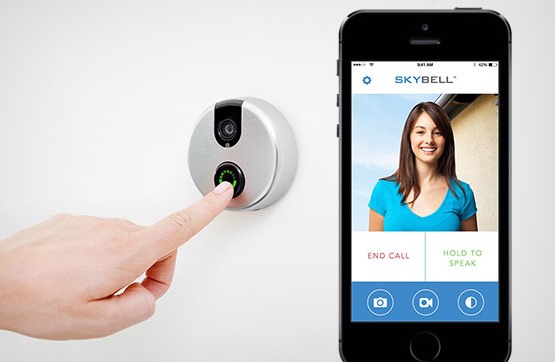
#2 SkyBell Wi-Fi Video Doorbell with iOS android app


Skybell is considered as the best example of ultra-technological life where you are informed who is at your door. This helps in viewing who is at the door, can hear and speak to the caller standing at the threshold. It helps you by providing live video feed on your Android phone or iOS. It is specially designed in USA for the ease and comfort

#3 Logitech Tunable Gaming Mouse with Fully Customization Surface


If you are a game lover then this device is lovable for you. Through this tunable gaming mouse, you can elevate your game with many features as weight/balance adjustment, DPI shifting , surface tuning calibration and 11 programmable buttons too.

#4 Reflection Wireless Air 3D Finger Optical Mouse


It’s a totally surprising gadget that provides you a wonderful experience . You must assume and are supposed to take your hand a new mouse. This wireless 3D mouse if finger optical mouse that helps you in performing a job of a mouse by your own finger imitating a cursor i.e. right-left/up-down.

#5 Projects Watch Twirler Black


Many guys prefer to follow the latest trends and they wear very trendy watches. So gift them this unique style watch that gives you a remarkable picture of time like never before. This is different from all the conventional wristwatches.

#6 Ultra slim Qi-enabled Wireless Charging for All Smartphones


Some guys usually all of us are so tired to stand up and find the nearby switch board. Now get rid of all such problems and let your lifestyle becomes easy. This wireless charger helps you in charging your phone wherever you are sitting . You must never run short of battery

#7 Bluetooth Audio Sleep Music & Phone Head Mask


If you love music, you will be breathing, seeing and listening to your music. Now, we have a Bluetooth Audio Sleep music head mask that let you hear cool music when you are on bed or you are travelling around through your Android mobile or Bluetooth device.

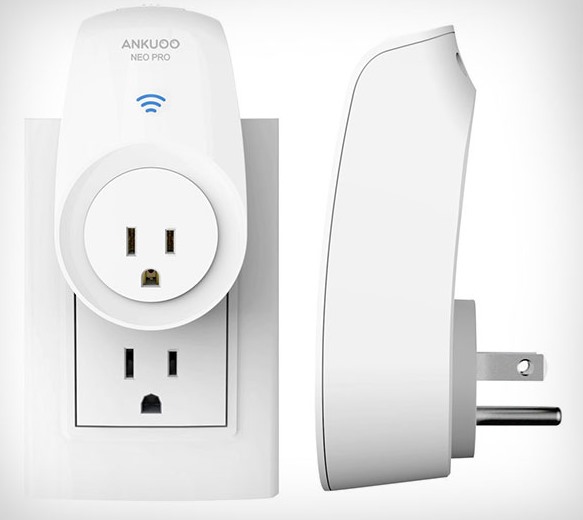
#8 Wi-Fi Smart Switch for Controlling Electronics


What to do to know about how much energy consumption is used in home appliances. The best way to detect is to use smart switch that let you know about the energy consumption by the electronic devices through its easy and simple interface. You can turn on/off your home appliances like TV, Heater, AC etc.

#9 Wireless Smart LED Soft White Bulb 80% Less Consumption


Everyone wants to control each and every thing and this all starts from your home only. It is a easy task to do by keeping the control of your bulbs and lights in your house with this LED soft white bulb. By the setting provided, you can dim or highlight the bulb in the mobile application and by your liking you can manage them too.

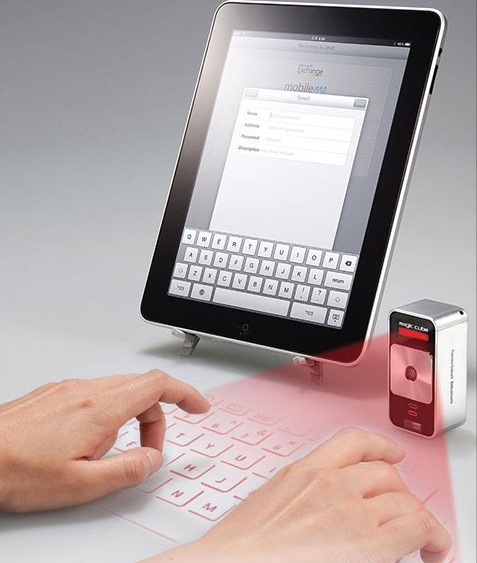
#10 Magic Cube Laser Virtual Projection Keyboard


It is a magical cube that is totally virtual with this tiny portable gadget .You can have the virtual keyboard wherever you are.

Sunday, June 17, 2018

WoW! Microsoft To Launch A New Version Of Xbox

We all know very well that the conspiracy war is eternal and has put the usual competitors face to face. Between the Xbox and PlayStation the competition is constant, with both brands claiming the lead. However, now according to the latest reports, the tech giant Microsoft to launch a new version of its well-known gaming console, of course, Xbox.


WoW! Microsoft To Launch A New Version Of Xbox

The conspiracy war is eternal and has put the usual competitors face to face. Between the Xbox and PlayStation the competition is constant, with both brands claiming the lead.
On the tech giant Microsoft. the side developments have been constant and a new rumour seems to point to the news on the Xbox side already in 2020.
The tech giant Microsoft was one of the big companies taking the stage at E3 and during its presentations did not hide that it was already preparing a new version of its Xbox console.


Of course, this information is not accompanied by any time window for the launch of these new features. Still, some rumours seem to point to a possible date, though not in the near future.
The existing information points to the year 2020 with the arrival of the successor to the current Xbox, with November being the most likely, looking at the history of the company’s launches.
What exists is a clear indication that Xbox Scarlett, the internal name given to these developments, will not only be a console but a “family of devices,” somewhat in the image of what already happens with the Xbox One X and Xbox One S.
It may seem strange that the tech giant Microsoft intends to launch this new Xbox, contrary to its development cycles and anticipating new proposals. The Xbox One X was released late last year.
Probably the idea of the tech giant Microsoft is to be able to anticipate Sony and have its console in the market well before the next PlayStation, thus captivating users of its rival.

So, what do you think about this? Simply share all your views and thoughts in the comment section below.

This New AI Tech Can See Through Walls And Track People’s Movement

We all know very well that for a long time, X-ray vision has been a resource in fantasy and science fiction novels. But recently, a team of researchers has developed a new AI that can easily see through walls and track people’s movement.


This New AI Tech Can See Through Walls And Track People’s Movement


For a long time, X-ray vision has been a resource in fantasy and science fiction novels. But it was always there. As recently, a team led by Dina Katabi has taken an important step in the evolution of this technology.
His latest project, RF-Pose, uses artificial intelligence (AI) to teach wireless devices to detect the postures and movements of people, even from the other side of the wall. To do this, the Katabi’s team has designed a neural network that analyzes the radio signals that bounce off people’s bodies. With this information, they create a dynamic figure that walks, stops, sits and moves their limbs as the person performs those actions.
The team says the system could be used to study diseases such as Parkinson’s and multiple sclerosis (MS), providing a better understanding of the progression of the disease and allowing doctors to adjust medications accordingly.
 
It could also help older people to live more independently while providing the added security of being able to detect falls, injuries and changes in activity patterns.
“Just as mobile phones and Wi-Fi routers have become essential parts of today’s homes, I believe that wireless technologies like these will help propel the houses of the future,” Katabi said in a statement.
Since the cameras cannot see through the walls, the network was never explicitly trained in data linked to what happens on the other side of the wall, which made it particularly surprising for the MIT team, is that the network he could generalize his knowledge to be able to handle it.
In addition to detecting movement, the authors also demonstrated that they could use wireless signals to accurately identify someone 83% of the time among a group of 100 people. This capability could be particularly useful for the application of search and rescue operations, when it may be useful to know the identity of specific people.
The preview, entitled Through-Wall Human Pose Estimation Using Radio Signals, will be presented at the Conference on Computer Vision and Pattern Recognition.

So, what do you think about this? Simply share all your views and thoughts in the comment section below.

Sunday, May 13, 2018

HDFC OnChat Loot Back – Earn Rs.400 Free For All User

HDFC Bank OnChat Offers: There are 3 offers on HDFC Bank OnChat. It is a new way to promote service. There is no need to download any App. It is easy and a fast way to gather people on their network. A new way to promote service. Let’s talk about the HDFC Bank OnChat Offers. There are three offers given by HDFC bank OnChat.


(Offer 1) First Transaction: Flat 20 % discount on your first transaction worth Rs. 100.  After Registration, you can avail this offer.

(Offer 2) First Movie or Bus Booking: Flat Rs. 100 Cashback on your first Movie or Bus Booking.

(Offer 3) Refer & Earn: Earn up to Rs. 400 when you refer your friends. You can earn cashback, not money. Means for each referral you will get Rs 40 cashback. On recharge or bill payment, you can avail this cashback code. 
Are you still confuse? Let me tell you all the offer in details. To avail any offer you have to first register yourself on HDFC Bank OnChat Service. Here is the Step By Step Guide to avail this offer.

How To Avail HDFC Bank OnChat Offer?

  • First Connect your messenger with HDFC Bank OnChat Service – Click Here
  • Accept & Continue. Messenger will open.
 Click on Get Started.


  • You have to enter your No. and then OTP on chat. No need to add extra words. Just type your number and OTP.

  • Now you can Enjoy Chat service by HDFC. It is powered by Niki.
  • You can ask for recharge, bill payment, Movie tickets, Bus Tickets etc.
  • Done!!!

How To Use HDFC Bank OnChat Service?

  • It is easy and automatic. It needs a single word to do your work. Means, they will ask for everything.

  • To use any service you can click on the Text shown in blue color. To get your referral link, click on More.
  • To know the offers click on Offers. If you don’t want to use this service then click on Cancel.

Any Existing OnChat User can refer to maximum 10 new users and collect Cashback worth Rs. 40 for each successful referral and the new user gets cashback worth Rs. 40 on first transaction. 
Any user will get a Cashback worth Rs. 40 on first successful transaction with HDFC Bank OnChat

Terms and Conditions:

  • Value of 1 Cashback point = 1 Rupee
  • Earn Rs.40 as cashback on each successful Referral Signup of your friend.
  • A user can earn a max of Rs.400 on your friend’s successful Sign Up during the offer period.(Rs 40 on each friend signing up)
  • Referred user should have a valid Facebook Profile. HDFC Bank & Niki will be the final decision makers in case of discrepancy.
  • Value of 1 Cashback point = 1 Rupee
  • Offer will be valid from 10th May 2018 to 31st May 2018
  • Successful Referral: A successful referral will be considered when the new referred user has signed up/registered on HDFC Bank OnChat
  • Maximum Points: A user can collect maximum 400 Cashback points through referrals.
  • Maximum Referrals: First 50000 successful referrals will be eligible to earn Cashback points. (from 10th May 2018)
  • A user can redeem 40% of available cashback points or 40% of payable transaction amount (whichever is lower) in a transaction
  • Cashback points and discount cannot be availed for Cabs and Movie Booking Transactions
  • These offers are provided by HDFC Bank
  • The services are powered by Niki.ai
  • HDFC Bank may change the offer terms and conditions or withdraw any cashback at any time without prior intimation.
  • Referral credits from previous campaigns will not be considered in this campaign’s limit.
  • All available referral credits will expire on 15th June, 2018

For Existing Users: Earn 100 Cashback points each on the first transaction of Bus Booking

Terms and Conditions

  • This offer is valid from 10th May’18 to 31st May’18
  • Get 30% Instant discount up to Rs.200 on Bus Ticket Booking.
  • The minimum transaction amount to avail discount is Rs.300.
  • The offer is valid only once per user during offer period.
  • These offers are provided by HDFC Bank
  • The services are powered by Niki.ai
  • HDFC Bank may change the offer terms and conditions or withdraw any cashback at any time without prior intimation.
  • OnChat points cannot be redeemed in case of discounted offers.

Sunday, April 29, 2018

Sonam Wangchuk brings Ladakh to hundreds of students across India with Airtel 4G

IT’S HERE, AND IT’S HAPPENING RIGHT BEFORE OUR EYES!


The digital revolution in India is gaining pace, with more and more difficult locations such as Ladakh progressing towards seamless digital connectivity.

This historic Sunday saw Sonam Wangchuk - a Ladakhi engineer, innovator, education reformist and the inspiration behind Phunsukh Wangdu from the cult movie 3 Idiots, set the ball rolling with this digital bridge in Ladakh.
Over the course of the last few days, Sonam Wangchuk, sitting out of Ladakh, used Airtel 4G services to conduct live seminars over video conferencing followed by web seminars with hundreds of students across the country watching and learning from him.


Mr. Wangchuk is the founding-director of the Students' Educational and Cultural Movement of Ladakh (SECMOL) and is also known for designing the SECMOL campus that runs solely on solar energy. He has received several awards and recognition over the years for his exemplary work, including the State Award for outstanding environmentalist by J&K government (2016), Global Award for Sustainable Architecture (2017) and Rolex Awards for Enterprise.
Mr Wangchuk has been a strong voice in advocating the cause of providing digital connectivity in Ladakh.
Faced with a host of issues like unstable infrastructure, difficult geographical terrain and political unrest in the state of J&K, Ladakh faces more challenges than any other regular remotely placed village in the country.
People all over the world use internet for education, online transactions, current events, entertainment, email/voice /video communication, research and so on. However, Ladakh, for a long time has been devoid of the benefits of this Information superhighway.


For telecom companies, the expense to invest in a solution in such tough terrains, far outweighed the profit potential in the sparsely populated area.
In December last year, Airtel became the first operator to provide 4G services in Ladakh region, thus bringing Ladakh closer to a journey of seamless connectivity.
Mr Wangchuk thanked Airtel 4G for working towards making it a reality in Ladakh while also throwing in a word of caution saying that Internet is a double-edged sword and can harm as much as it can help us if we are not careful.
In a world built on email, websites, online transactions, with milestones like the one achieved by Mr Wangchuk and Airtel 4G, the dream for a 'Digital India and Cashless economy' seems not too far from turning into a reality.

Thursday, November 16, 2017

UC Browser is Removed From Play store | Check Out why ?

Hello readers, we are back to you with a news of UC Browser disappears from Play Store for some reason. But we don’t have to worry as it will be back after a week. So let us discuss in detail what actually happened.

A popular browser in India, UC Browser with more than 500 million downloads around the world was deleted from the Google Play Store. The reason why it is deleted is that the misleading campaigns UC Browser was running. UC Browser is China Based browser and is the first mobile browser in India with more than 100 million users in India. UC Browser has a bigger base than Google Chrome.

 On Google Play Store, we can see only UC Browser Mini is listed. The UC Web has given a statement on why UC browser is taken out from Play Store. Artem Russakovskii, an Android Polices founder shared about the email got from the UC Union which talks about UC Browser using ‘Malicious Promotion’ methods.

UC Browser has taken down from Google Play Store

The Spokesperson of UC Browser said in a statement, “We were informed by Google Play about temporary removal of UC Browser from the Play Store for 7 days, beginning 13 Nov 2017, under the reason that a certain setting of UC Browser is not in line with Google’s policy. We have conducted an urgent internal investigation and fixed the problem. The new version has been uploaded to Google Play’s Developer Console and is awaiting evaluation. We will actively cooperate with Google Play for any concern caused by this unintentional error. In the meantime, users can still download UC Browser Mini from the Play Store, an alternative version of UC Browser. We thank Google Play for their understanding and support extended to us. UC Browser new product package will be back on Google Play next week.


As per the reports on Android Central, who shared the mail, the main reason for deleting UC Browser could be “malicious redirect ads served up by UC Web’s affiliates to inflate installs.” The full email is shared on Reddit and on Twitter by the name Mike Ross. Mike is the one who works with UC Browser and he posted a tweet and explained about the app why it is deleted. 

Saturday, September 9, 2017

How to Remove Watermark from Photos Quickly (4 Methods)

Watermarks are specifically used to safeguard the owners’ authenticity, barring others from making use of these images without their permission. It may happen so, that you need to use some images urgently in your presentation, but there are watermarks present on them. People in marketing often undergo such situations wherein they need to edit a picture owned by the company, but are unable to access the original. Thus, you must know How to Remove Watermark from Photos.
Sometimes it is much easier to buy the picture if it is a stock photo. But in case you cannot afford it, and keeping the value of time in mind, there are certainly quick and easy ways to remove the watermark from the photo.
Read on to know these simple methods.


Inpaint by Teorex


Inpaint is a highly advanced and innovative picture editor that saves a considerable amount of time in removing unwanted objects from images.
To remove watermarks, use the following simple steps:
  1. Open the image that contains the watermark, in Inpaint. Alternatively, you can go to this link. This is the Web version of Inpaint.
    On opening Inpaint, you will notice several tools on top and left of the screen.
  2. In this step, you need to pick the watermarked area of the photo. To effect this, use the “Marker” tool, present in the left toolbar. It looks like a crayon being used on a piece of paper. You may also use the “Magic Wand” tool to select the watermark in one click.
  3. Now you need to restore the image. For this, click the “Erase” button in the top toolbar. This will process the image and remove the watermark.
As evident, this is a very fast method that helps get your work done in a few minutes.

Photo Stamp Remover

Photo Stamp Remover is a specialized program from SoftOrbits, designed to Remove Watermark from photos. Let us see how you can use it.
  1. You need to upload the picture with watermark first. Use “Add file(s)” option in the top toolbar. Photo Stamp Remover also allows you to select multiple photos, as it has batch conversion mode.
  2. Use the “Marker” tool to select the watermarked area. The icon for this tool features a marker with blue rim.
  3. After selection, use the “Remove” button in the top toolbar to remove it.
    These three steps do not take long, seconds or minutes, depending upon on the number of photos.

Adobe Photoshop

Adobe Photoshop (versions CS5 and later) supports a feature called “Content-Aware Fill,” which shall help you save a lot of time, and gets the job done 9 out of 10 times.
Follow these steps to make use of the feature, and get watermark deficit photos.
  1. Launch Photoshop. As always, you need to open the photo from which watermark is to be removed.
  2. The left toolbar has a “Spot Healing Brush Tool.” It has a bandage over a white spot in its icon.
  3. Check the radio button for “Content Aware” on the top toolbar.
  4. Use the cursor to move the brush carefully over the watermark. The “[” and “]” keys could be used to increase or decrease the size of the brush. Thinner lines may require thinner sizes of the brush. Moving over the watermark will erase a portion of it.
  5. Continue doing it over all of the watermarks, until it is erased completely.
If areas of the watermark are large, use the “Lasso” tool.
  1. Select the “Lasso” tool in the left toolbar. It looks similar to a cowboy lasso.Step
  2. You need to drag a lasso around the watermark. Position the cursor on the border of the watermark, and drag around it.
  3. Open the “Fill” menu by pressing “D” on the keyboard.
  4. In the “Use” drag-down menu, select “Content-Aware.” Next, click “OK.” This will cause the watermark to blend with its surroundings, and it will be removed.

Alternative ways

The watermark, if present on the corners, or near the borders, could be cropped out using any simple photo editor. Or, you may use the “Snipping tool” in Windows to take a screenshot and edit it. Mac users can tap on “command + shift + 4” to use a screenshot tool to the same end. Though you lose a part of it, this method maintains the spirit of the photo.
Try and find a version of your photo with no watermark. You can drag your image to the Google image search bar, and find an alternate version in the results. Popular free photo sites like Flickr and FreeImages may also help in this case.
There are other online tools like Pixlr and Photoupz which also prove useful to remove watermarks. You may get them free of cost, or sometimes they require a license for the product.
However, the above-mentioned methods will nevertheless prove very useful to Remove Watermark and will consider both time and quality in their operation.

Tuesday, September 5, 2017

8 Best Free Online Proxy Browser Services (2017)

Before telling you about the best Free Online Proxy Browser Services lets first understand what exactly is a proxy browser. A proxy browser helps you stay anonymous online so that you can browse safely without being watched by any third party. Proxy browsers use various IP address across the globe to mask your real IP address. The IP address keeps on bouncing from one to the other making it impossible for any person to track you. However, your ISP will still be capable of seeing all your browsing activities. A proxy browser intercepts the data between your computer and the website that you are visiting. Following are the eight best Free Online Proxy Browser Services.


VPNBook


You can use VPN book to surf the internet anonymously. VPNBook provides you with free SSL- encrypted web proxy so that you can browse with privacy and freedom. VPN book automatically records your web activities in its logs. This log is maintained for recording any illegal activity carried out through this proxy browser. However, this log gets automatically deleted after a week. This proxy browser supports HTTPS websites too. You can choose proxy browsers based in USA, UK, and Canada or let the website choose one for you randomly.

Hide my Ass

Hide my ass is another one of the Free Online Proxy Browser Services. This is a very good option if you want to browse the web anonymously without having to download software or add an extension to your browser. Hide my ass is safe, secure and a fast option for browsing anonymously. It lets you choose proxy servers based in the US, UK, and Netherlands. Other countries are also available to choose from in the drop-down menu. But, to choose servers from countries other than the above mentioned, you have to upgrade to a premium account. Premium account has better features.

K Proxy

K proxy is a proxy website service provider. It can be used by visiting its website, by adding K proxy extension to your browser or by installing a portable version of Mozilla Firefox which already has K proxy extension added to it. It keeps a log of the records like your IP address; websites visited, pages viewed, etc. The free version of K proxy lets you surf for 3 hours in a stretch. Once this limitation has been reached, a pop-up message will appear requesting you to upgrade to premium account. You can each upgrade to a premium account or wait for 30 minutes and start browsing anonymously for free again.

Privoxy

Privoxy is the ideal solution for all your online privacy related issues. It masks your IP and lets you browse the internet anonymously. What makes Privoxy different from other websites and software in the list is that with the help of Privoxy, you can turn your PC into a proxy server. So, if you are outside browsing while connected to a public WiFi, you can use your PC as a proxy server. All you have to do is keep the computer on at your home. Privoxy logs your web activity.

FilterBypass

FilterBypass is a proxy server website which is very serious about the security of the person using this website for anonymous browsing. It has some additional security features like URL encryption, page encryption, disabling cookies and scripts. All these features are available for free. These features are often found in premium or paid proxy server websites. FilterBypass logs your activity and releases it if necessary to the government agencies if you have done anything illegal through this website. You can view videos that are not made available to your country by using FilterBypass.

Securefor.com

Securefor.com is a very basic and simple one of the Free Online Proxy Browser Services. This website does not have a fancy layout or attracting design. But, it does the job of keeping you anonymous very well. You can use this website for surpassing restrictions imposed by your country or college and visit websites and watch videos anonymously and safely with relative ease. All you have to do is visit this website, type the URL in the search bar of the website you want to attend anonymously and press enter.

NewIpNow.com

The best feature of this website is the multi-IP feature. Which means you can choose a new IP whenever you wish to and start browsing using that IP address. On the front page of the website, you will see the most used proxy servers. These servers are mainly from the US and UK. NewIPNow.com protects your browsing history with their URL encryption scheme. This website is a safe and useful website for browsing anonymously.

Hide.me Proxy

What makes this website my personal favorite is the fact that there are no annoying ads whatsoever on this website. You can easily use this website for browsing anonymously. Hide.me proxy is very safe and secure. All you gotta to do is type the URL you want to visit in the search bar placed at the head of the screen and press Enter. You can choose proxy servers from the US, Germany, and Netherlands. Another unique feature about this website is that they do not let any servers log your web activities. This website is used by more than 5 million users across the world which makes it pretty trustworthy.

Thursday, August 31, 2017

Skype Makes Coding Interviews Easier With This New Feature

We all know very well that Skype has always been used as a communication tool. Above all its basic functions, many can take away much more. Hence, recently, the tech giant Microsoft just added an awesome new feature to its Skype Messenger simply to make coding interviews easier.


Skype Makes Coding Interviews Easier With This New Feature

Skype has always been used as a communication tool. Above all its basic functions, many can take away much more. Something that is increasingly seen is the use of Skype in job interviews, dispensing the physical presence.
But Skype has taken yet another step and allows job interviews to be done, where a programmer can display their code in real time and as a publisher of their own.
Skype’s idea for creating this real-time code editor is to allow job interviews to be made through the browser to programmers who show their capabilities directly on the platform without having to switch platforms.

Hosted exclusively on Skype.com, the web version of this communication tool, these interviews allow all typed code to be viewed by both parties and compiled immediately. It is a complete tool that anyone can access, giving access also to the complete Skype package: video, text and everything else.


The languages that this editor supports, for now, are C, C++, C #, Java, JavaScript, Python, and Ruby. As a complete editor, the syntax color is also available. The real-time compiler allows both to see the result of the code that was created.
Fully seated in the browser, this new service can be used in Edge or Chrome, just you have to go to this address. Without any need to register or install anything else, a code will be given that should be shared with the respondent.
In presenting this news, the team that created it stressed that it needs all the information that users can share, in order to grow this tool and make it even better and adapted to what users need.
This is another simple way that Skype has found to grow its service, opening it to other areas where despite being used, it was done imperfectly and without the right tools.